

In today’s world, the Internet is an important tool for business development and profit generation for many companies. Therefore, it is extremely significant that an online store or official company website not only receives a steady stream of potential customers, but also that the number of visitors increases over time. Unfortunately, every online business owner has found themselves in a situation at least once where the traffic dynamics on their site deteriorated, resulting in a significant decrease in the number of orders and sales. In this article, Netpeak Software specialists have prepared a step-by-step guide that will help you understand the reasons for the traffic downturn on your website. It will show you what you should do to restore and increase the flow of users and potential customers.
Step 1: Check if the traffic monitoring service is working correctly
Before you start analyzing the reason behind the supposed decline in traffic, you should ensure that the service you use to monitor traffic on your website is working correctly. For example, if you use Google Analytics, you need to check whether the services monitoring code is installed on all pages of your site. You also need to check whether this code is installed correctly (i.e. that the code is installed in full, not in fragments, and that the code does not contain unnecessary fragments of other code)). If everything is fine with the traffic monitoring system, you’re ready to proceed to the next steps.
Step 2: Check the impact of seasonality
Not all cases of traffic decline indicate problems. Sometimes the number of users on a website can decrease due to the influence of seasonality. This means that during a particular period of time, users need certain content, products, or services that you offer on your website. For example, winter clothing is most relevant in late fall and early winter, while summer vacation products are of interest to users only in late spring and summer.
To understand whether it’s really a matter of seasonality, you should compare traffic with the previous year or past several years. It is not necessary for the quantitative indicators to be the same—we are only interested in the dynamics. If you superimpose this year’s traffic graph over last year’s and the dynamics are the same or similar, this indicates a seasonal decline in traffic.
Here’s an example of comparing traffic to determine seasonality in Google Search Console:

If the decline in traffic turns out to be seasonal, this is a completely natural process that has nothing to do with the quality of the site. In this case, you accept the seasonal decline and come to expect it each year. Or you can expand the range of goods or services you provide and increase the amount of content that will be of interest to users during the slack period. If there is no seasonal decline in traffic, it is worth checking the dynamics of demand and the dynamics of positions, which will be discussed below.
Step 3: Check the dynamics of demand for website content
In addition to a seasonal decline in traffic, there may also be a single decline caused by a sudden loss of user interest in content, goods, or services, or a decrease in their popularity. This could have been observed recently when traffic showed positive dynamics.
To understand whether the decline in traffic was due to a decrease in demand, review the dynamics of impressions in Google Search Console, as seen here:
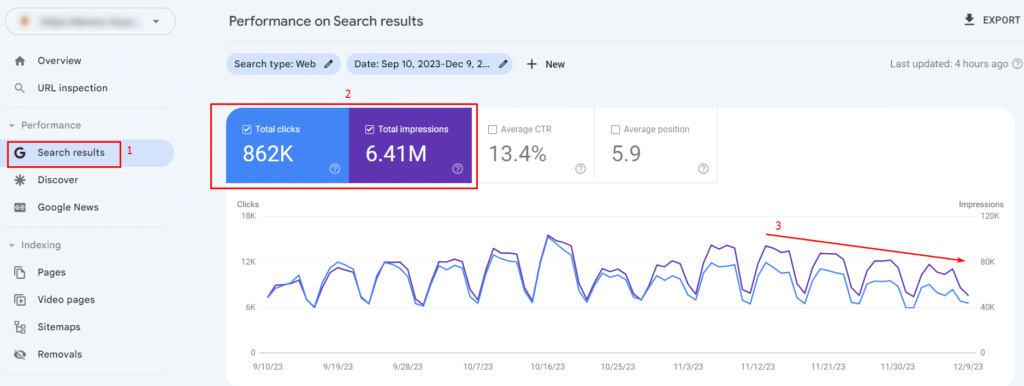
If the dynamics of impressions correspond to the dynamics of clicks in the Google Search Console, then the decline in traffic is due to a decrease in user interest. Otherwise, the traffic has decreased due to a deterioration in the site’s rankings. Let’s talk about how to check this and what to do about it below.
In this episode of SEO Made Easy, Martin Splitt explores how to utilize Google Search Console to enhance your content’s optimization. Learn techniques to pinpoint pages that receive abundant impressions yet sparse clicks, and obtain advice on improving their relevance.
Step 4: Check the dynamics of website positions
If the hypotheses about seasonality and decreased demand have not been confirmed, it’s time to check the dynamics of your search rank positions. You can examine this in Google Search Console by selecting the target country and the pages for which the slump is occurring:
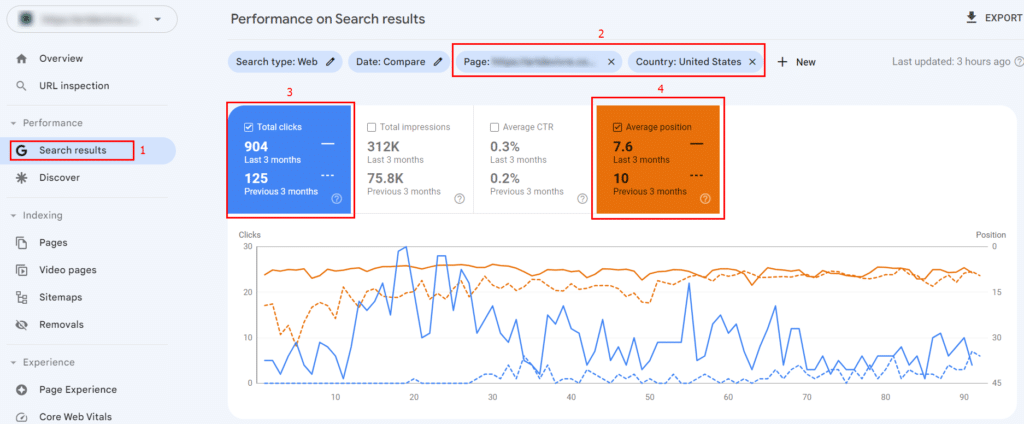
If the dynamics of a page with a drop in traffic have deteriorated, then the drop in traffic is due to a drop in page rank position in the search results. In this case, you need to identify the search queries for which the positions have deteriorated, which can be done in the “Queries” tab:
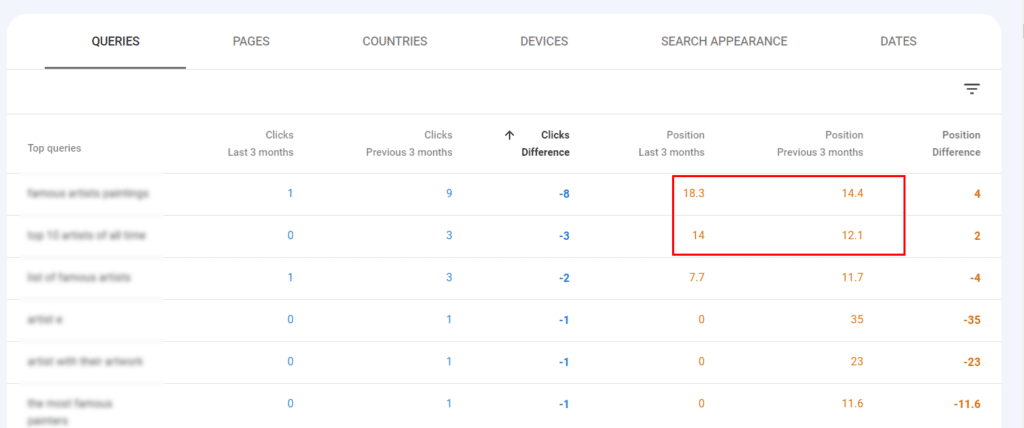
Next, you should check for keywords that have been dropped in the Title/Description meta tags and in the texts on the landing pages of your site. If they are not there (or there are too few of them), you should add them (or increase the number).
If the dynamics of the position of the page have not changed or have even improved, then the slump occurred for other reasons, which we will consider below.
Step 5: Check the search results for additional information blocks from Google
The reasons for the decrease in organic traffic to a website may be related not only to the website but also to the search results. In particular, the decrease in users on the site may be due to the increase in additional information blocks from Google in the search results, for example:
Blocks with promotional products from “Merchant Center” on the topic of the keyword:
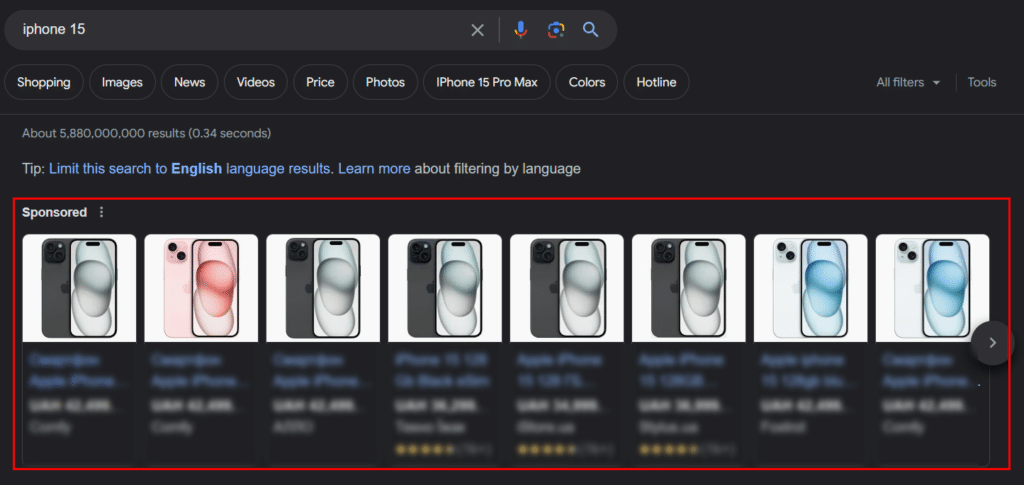
“Google Ads” ads on the topic of the keyword:
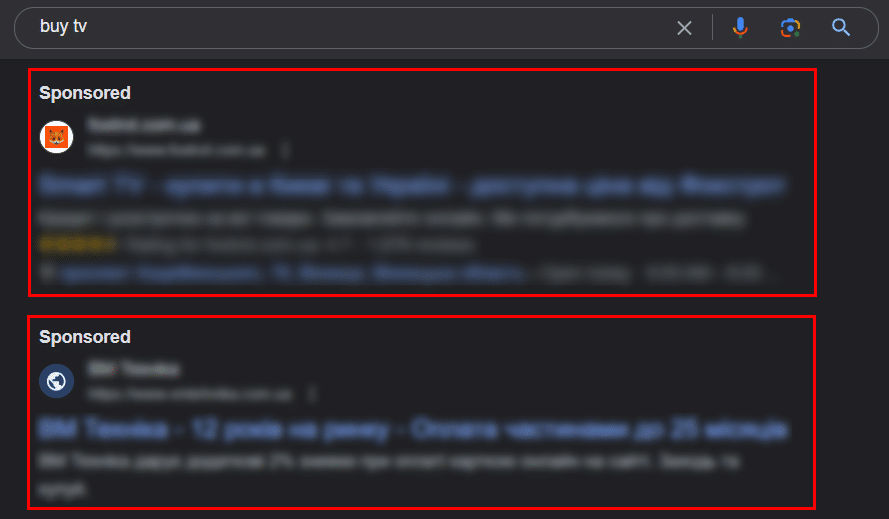
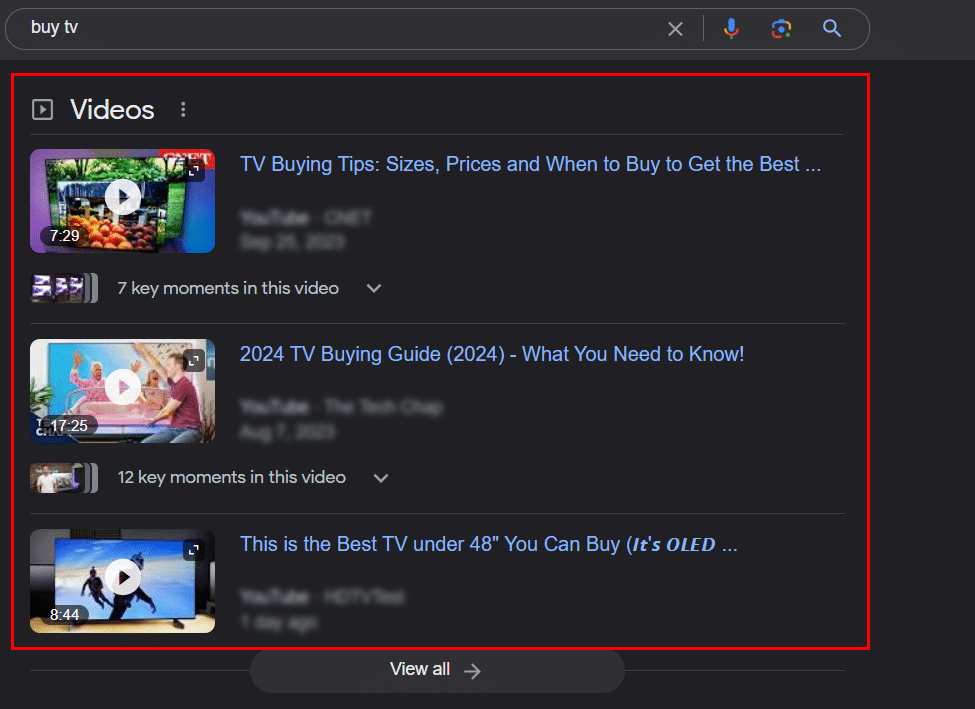
Blocks with videos on the topic of the keyword:
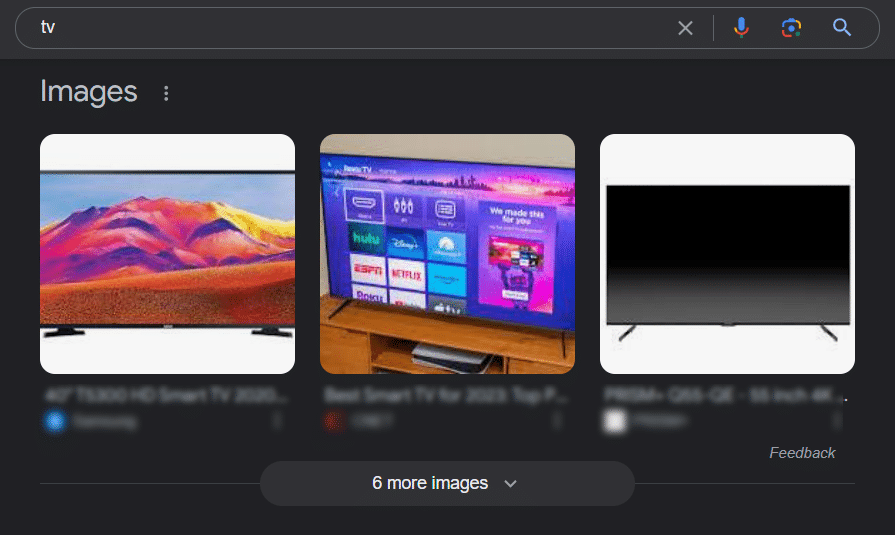
Blocks with images on the topic of the keyword:
A block with similar keywords “People also ask”:
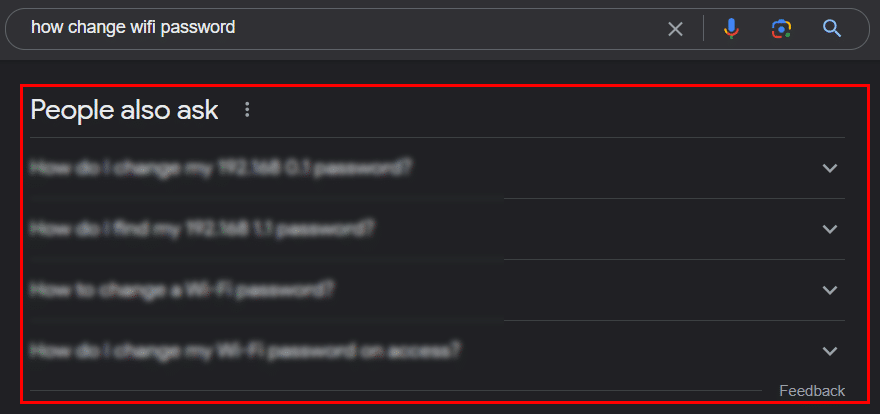
If your site has lost traffic, you should check whether additional informative blocks have appeared in the search results, which visually push other search snippets down. For example, if your website has always been in positions 3-4 for a certain search keyword, then due to the addition of one or more Google blocks your site’s position may visually fall to a place in the search results that’s equivalent of what used to be the 10th position. Or even lower (depending on the type of additional blocks, their number, and size)). As a result, despite a site maintaining the same position in search results, the number of users on the site may decrease. But this is not the end of the possible reasons for the decrease in traffic; we will consider even more reasons for the decrease in organic traffic on the site below.
Step 6: Check if Google has launched a new Core Update
Another reason for the decrease in traffic may be the next Google Core Update, during which the search results can be abruptly and unexpectedly rebuilt (often for no apparent reason). You can check whether a Google Core Update occurred during the period of traffic decline in the Google search algorithm update calendar.
You should also read Unveiling the Shadow Side of Google Core Updates
If this hypothesis is confirmed, you should proceed as follows:
- Do not make any significant changes to your website during the Google Core Update rollout.
- After the official completion of the rollout, wait another 1-2 weeks for traffic to recover on its own.
- If, 1-2 weeks after the Google Core Update is completed, the dynamics of users on the site have not recovered, create a list of pages and keywords for which the drawdown has occurred.
- Next, check whether the pages that have fallen are free of technical errors.
- If no technical errors are found, check the content for the occurrence of the keywords that have dropped in the meta tags and texts.
If none of the above works, you should conduct a comprehensive analysis of competitor sites and search results to understand which of your competitors has fallen in search results, which has risen, and what caused it.
Comparative Analysis of Studies Investigating Content Quality Factors
Step 7: Check Google Search Console reports for new errors
If none of the previous steps worked, you should check all Google Search Console reports for new errors:

If new errors are registered in Google Search Console during the period of traffic decline or shortly before the decline, they should be investigated in detail and, if possible, corrected. If no new errors are found, it is recommended to conduct a comprehensive technical audit of the entire website, which we will discuss further.
How to fix Discovered – currently not indexed issue on your site
Step 8: Conduct a technical audit of the website
A comprehensive technical audit involves a global check of the site for technical errors that could have caused a drop in organic traffic. For this purpose, additional software or online services are used. One such program is Netpeak Spider. It is available at a very reasonable price, and it can be installed not only on Windows but also on Mac.
To conduct an audit, launch the program, enter the website URL in the search bar, and click the “Start” button. For a basic audit, it is recommended to choose a standard set of parameters.
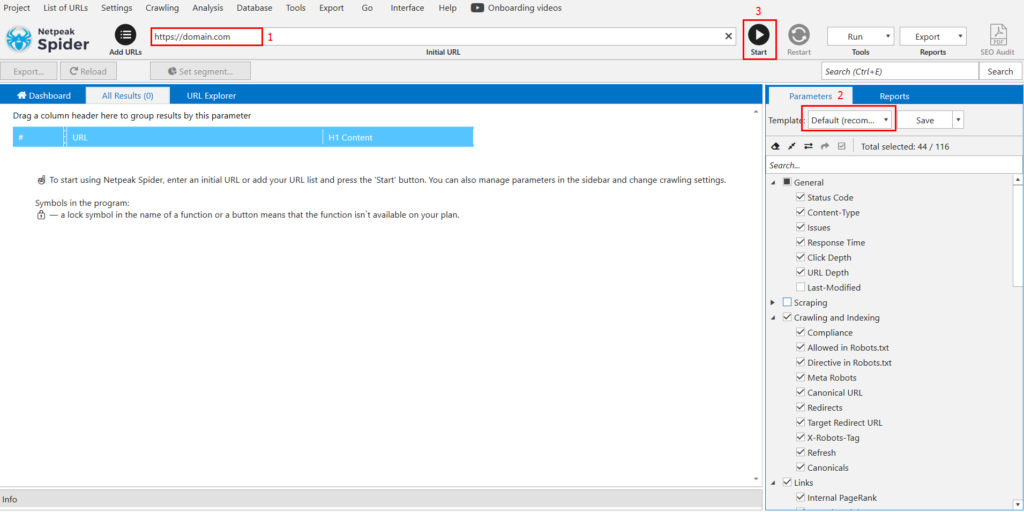
After the site check is completed, the program will independently generate a list of all errors and give basic explanations of what should be fixed and why.

To make your website optimization journey even more rewarding, we’ve partnered with Netpeak Software to offer an exclusive 20% discount on your purchase. Simply use the promo code “vproexpert” during checkout to unlock this special offer.
Briefly about the main points
Traffic drops do not always indicate problems with the website. Sometimes the reasons may be external, such as in the case of the appearance of additional blocks from Google in search results or a decrease in demand for goods, services, or content. However, if the reasons for the traffic drop are due to errors on the website, you should definitely check the pages that have seen a decline in traffic and, if necessary, conduct a comprehensive technical audit of the website.
SEO tips
Conducting speed tests on webpagetest.org:
WebPagetest is a free tool that allows you to test the loading speed of your webpages. By testing a range of templates, such as the homepage, category, and post pages, you can identify any performance issues and make improvements to optimize the user experience.
Checking archive.org for site template and structure changes:
The Internet Archive’s Wayback Machine is a digital archive of the web that allows you to view historical versions of websites. By visiting archive.org and reviewing key pages from the period of peak traffic, you can identify any changes to site templates or structures that may have impacted performance or functionality.
Examining SEMrush / Majestic for linking profile changes:
SEMrush and Majestic are tools that provide insights into a website’s search engine performance and link profile. By reviewing changes to your linking profile over time, you can identify any potential issues with backlinks, such as spammy or low-quality links, and take steps to improve your site’s authority and credibility.
Regenerating and resubmitting a double-checked sitemap file in Google Search Console:
A sitemap is a file that lists all of the pages on your website and helps search engines understand its structure. By regenerating and resubmitting a sitemap file in Google Search Console, you can ensure that Google is aware of all of the pages on your site and can crawl and index them effectively.
Linking Google Search Console and Bing Webmaster Tools:
Google Search Console and Bing Webmaster Tools are free tools provided by Google and Bing respectively, that allow you to monitor your website’s performance in their search engines. By linking your Google Search Console account to Bing Webmaster Tools, you can view data from both tools in one place and streamline your search engine optimization efforts.